Deterministic module
B2B order management: Order Management System (OMS, also Seller Center)
The sale closed, and that is where B2B order management begins: the work nobody demos. The order reads "picking" to the buyer, "invoiced" in the ERP, and as an open question in the sales rep's chat thread. Someone marked it shipped before it left the dock, the customer calls the rep, the rep calls the warehouse, and the cost of that reconciliation shows up on no spreadsheet.
In short
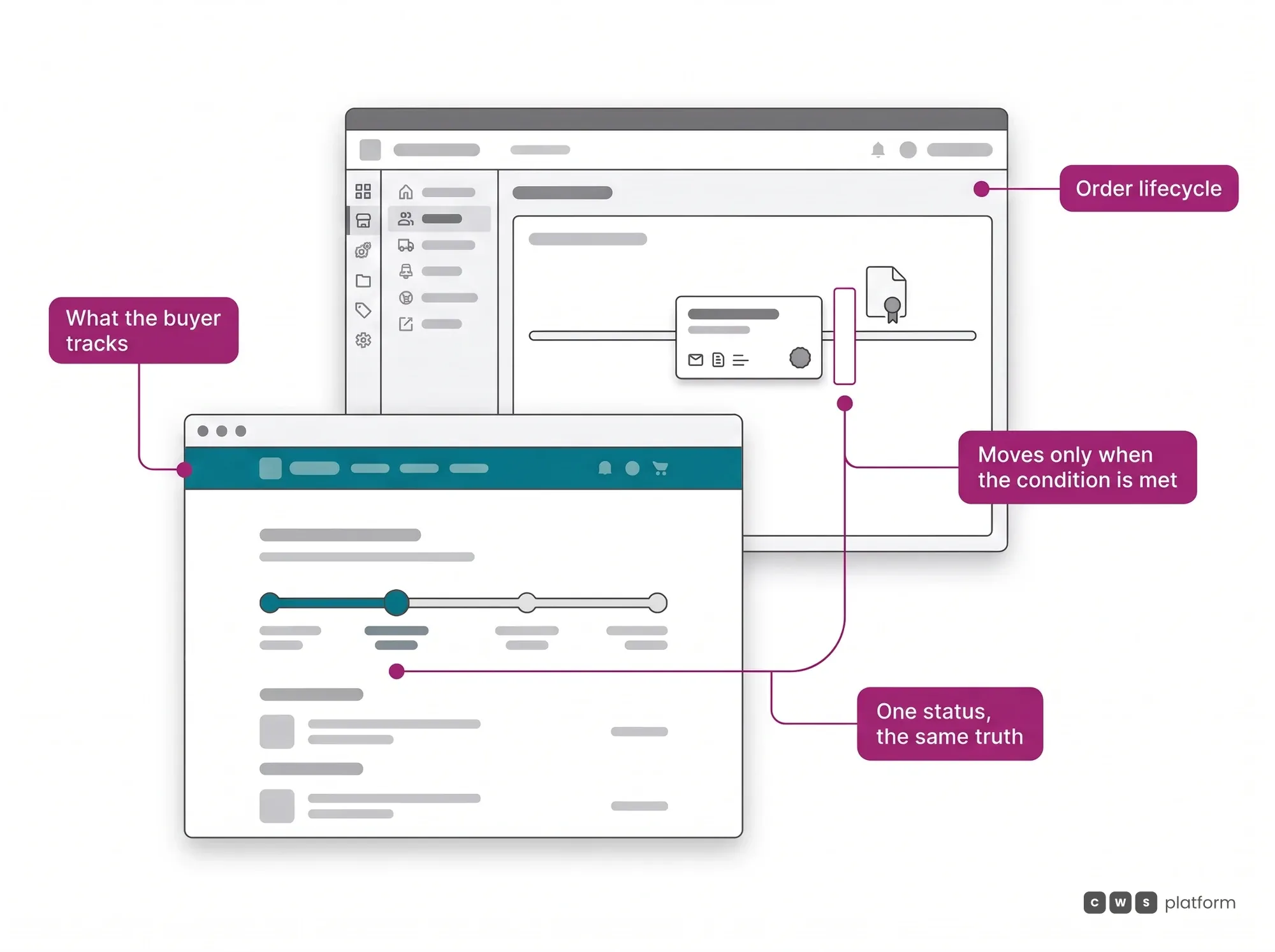
B2B order management is everything that happens to an order after the sale closes: approval, invoicing, shipping, delivery and returns. On CWS Platform, the Order Management System (OMS) runs ten event-driven states, and an order only advances when the stage's condition is proven, such as the ERP order number or the tracking code, with one record for buyer, seller and ERP.
- Who may sell, how offers compete and how value is divided is set in the marketplace module. Source: Marketplace Management Platform (Marketplace Center).
- In a governed marketplace, the order arrives split by origin. Source: B2B marketplace platform.
- In a dealer network, one consumer order can come from several dealers and the factory. Source: dealer portal.
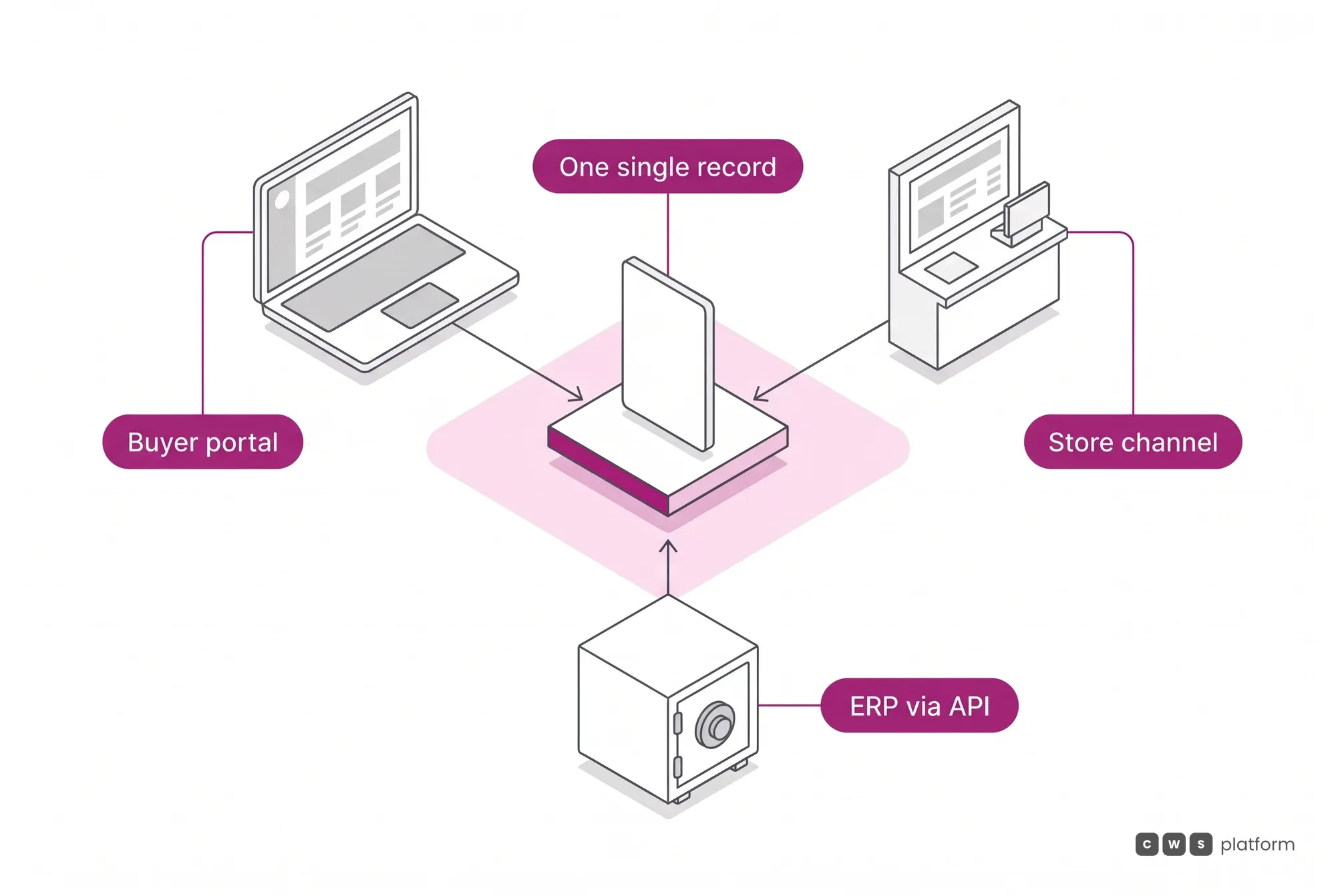
- The ERP stays the system of record, integrated through APIs and webhooks. Source: APIs and integrations.
Integration with the ERP you already run is one of the criteria in the guide to choosing a B2B ecommerce platform.
What it is
The module that orchestrates the order's life cycle once the order exists. Ten event-driven states, from pre-order through delivered and completed, plus the canceled, lost and returned outcomes, and the order only changes state when the corresponding event actually happens. The initial states are generated by the platform itself and cannot be changed by the integration; when an order exceeds the credit limit, the store's rule decides whether it is blocked, goes to review or is completed as paid; and abandoned pre-orders can be canceled automatically after a configurable period, including per category. It is one machine seen from two sides: the merchant calls it the store channel, operations and the ERP call it the Order Management System. Who may sell, how offers compete and how value is divided are questions for the Marketplace Center; here the question is where this order is and what has already happened to it.
The order lifecycle in 1 minute
The capability no one replicates
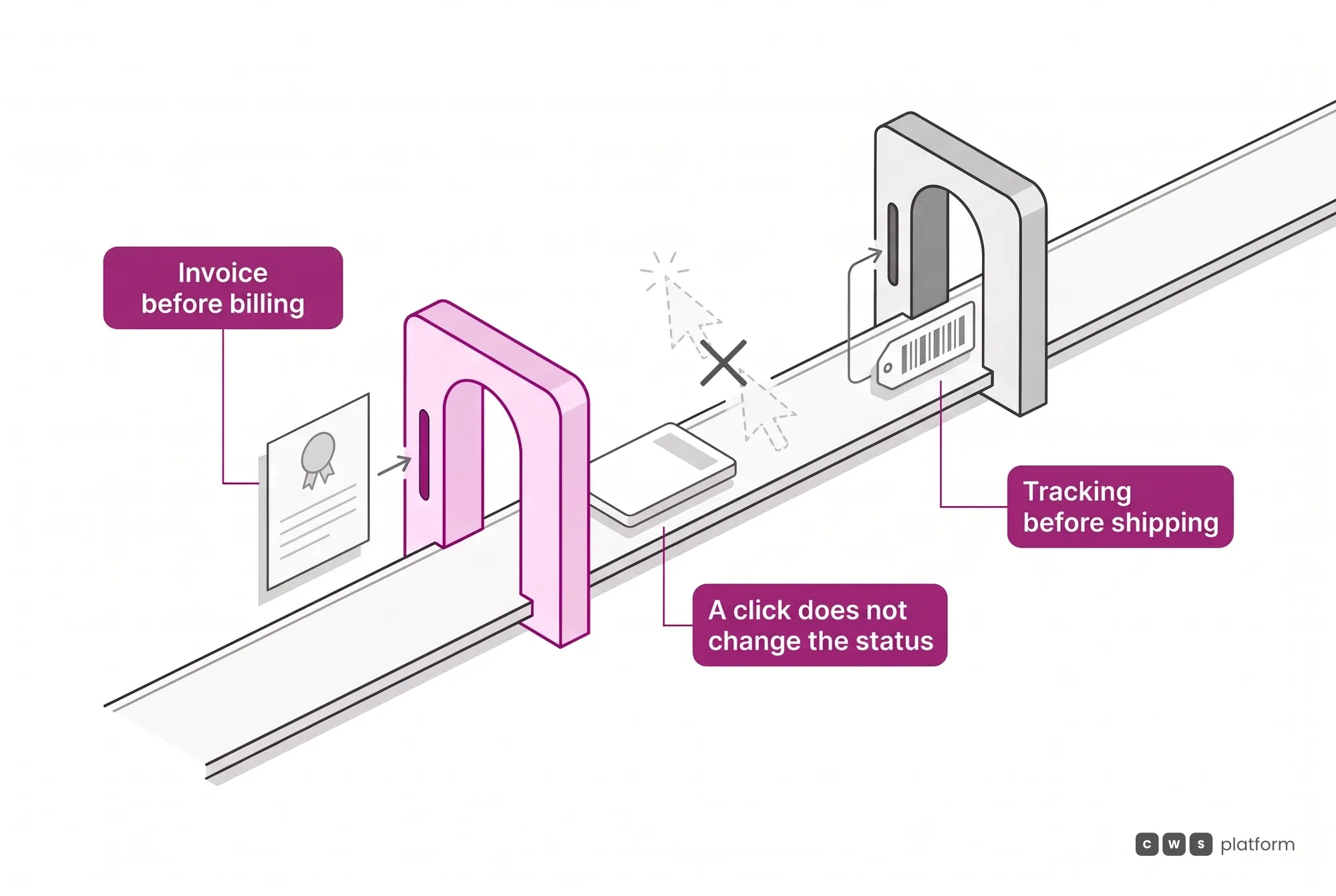
A state does not advance because someone clicked, it advances because the condition was met
In most systems status is a label someone switches, which is exactly why it lies. Here every stage has an entry condition: READY requires the ERP order number, and the Nota Fiscal data can go along, in READY or in SHIPPED, or be mandatory, if the operation configures it that way in the sales process; SHIPPED requires the tracking code, from the direct Correios integration, another integrated carrier or a link to your own system, CANCELED requires a reason, which is passed on to the customer, and a shipping method that needs package dimensions will not let the order leave without them. The flow only moves forward: a shipped order never goes back to ready to ship, and from there it can only become delivered, canceled or returned. Once delivered with no dispute, it moves to completed on its own at the end of the withdrawal period. Status stops being what the operation says it did and becomes what it proved, and that difference is what makes the data reliable enough for finance and for the customer to depend on.
One order, three readings that cannot drift apart
The buyer follows it in the portal, the merchant works it in the store channel, and the ERP reads and updates it over the API. These are not three copies synced now and then, it is the same record read from three places, and every order carries where the sale originated and who is responsible for delivering it. On a multi-seller order that stops being a detail: without that marking, nobody knows which party owes which part. That is why the parent order controls the aggregated cart and splits into child orders per store and per warehouse, each with its own products, value, freight, preparation time and tax document; each supplier configures its payments independently, within the portal owner's general criteria, and only the credentials of the seller who made the sale can update the status of its part. When credit and invoicing must come out on a single document, the store can restrict each order to a single warehouse or a single store.
Canceling an order is a permission, not a button
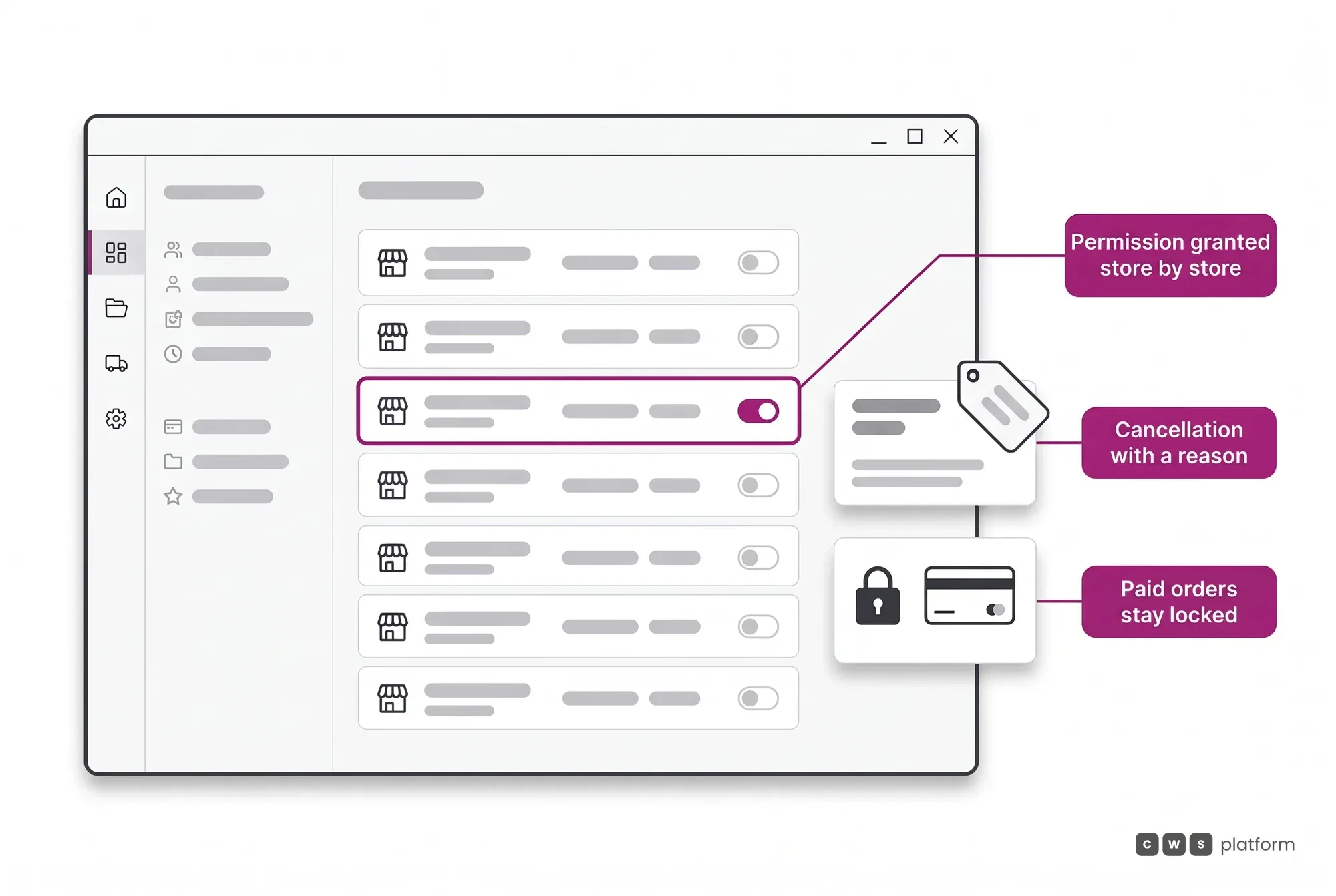
Letting a seller cancel unilaterally looks like an operational courtesy, and it is the front door to a marketplace's worst behaviors. The platform treats this as a governance decision and keeps it closed by default, because it knows what happens when it is opened without criteria:
- Stock that isn't there. The item shows as available, the order comes in, and cancellation becomes the patch for a listing that was never true.
- Renegotiation after the sale. The price agreed on the portal turns into an opening bid, and "out of stock" turns into leverage to ask for more.
- Cherry-picking orders. Sellers keep the good orders and hand back the bad ones, and the buyer pays for it in lead time.
- Selling off-platform. The order is canceled on the platform and redone privately, using the buyer's details the platform handed over.
So the permission does not start with the seller: the store where the order originated grants it, in a setting of its own. Until the originating store enables it, the seller does not cancel and that store does; cancellation requires a recorded reason; and an order already approved by the payment method stays locked even where the permission is active. It does make sense to open it where there is no contention, such as an operation in which each seller answers for a territory of its own. The point is never the button, it is who answers for its consequences.
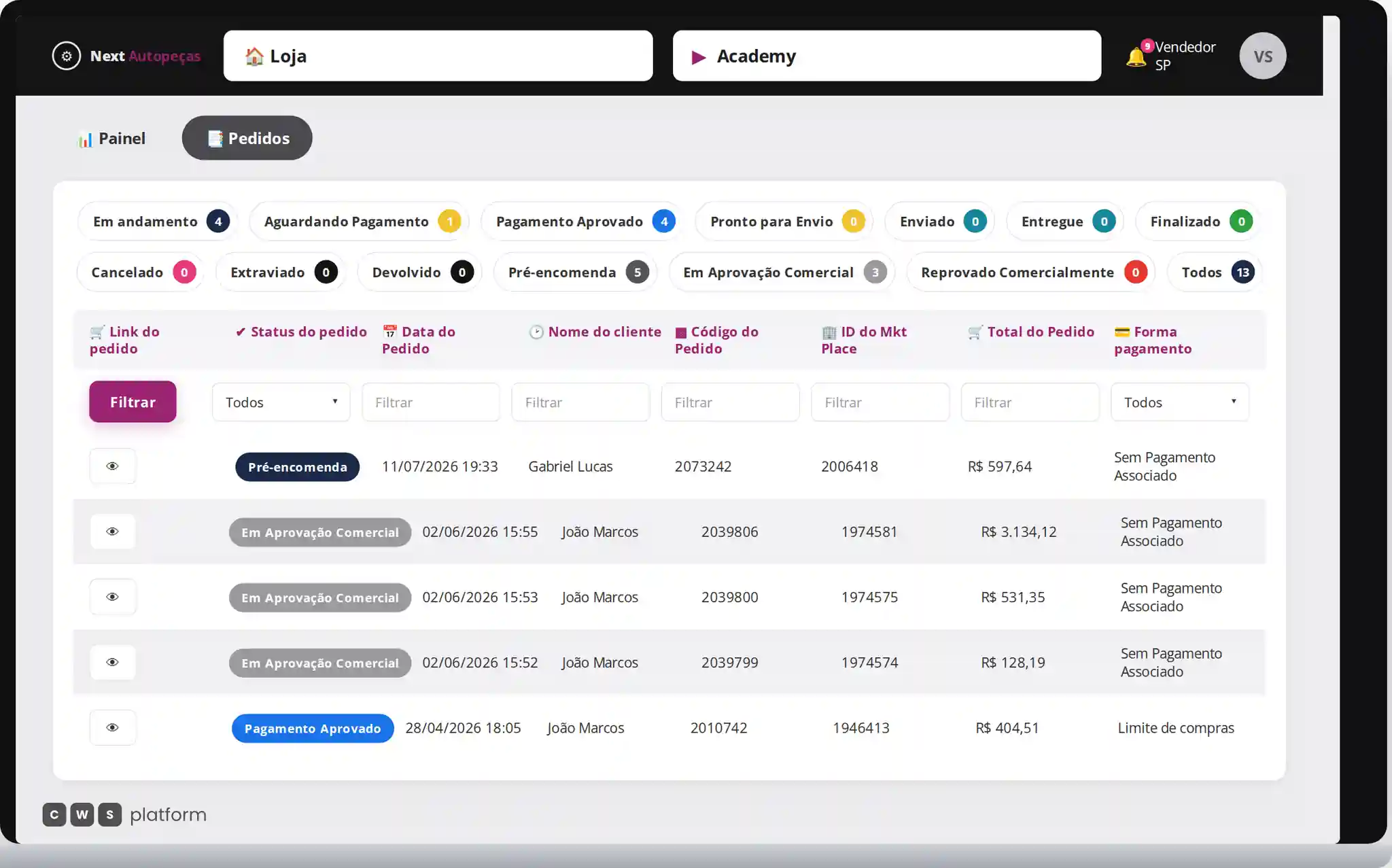
O pedido continua sob gestão
Painel do Vendedor da loja de demonstração, com chips de status e contagens, incluindo Em andamento 4, Pré-encomenda 5 e Em Aprovação Comercial 3.
- Ciclo de vida visívelos chips organizam os pedidos pelos diferentes estados da operação.
- Aprovação comerciala negociação mantém um ponto explícito de decisão humana.
- Filtros operacionaisstatus, data, cliente e outros campos ajudam a localizar pedidos na tabela.
Abaixo, filtros por coluna e uma tabela de pedidos.
O OMS entra neste ponto para provar que a jornada não termina na criação do pedido. Cada negociação segue por estados operacionais visíveis, inclusive pela aprovação comercial, onde o vendedor atua como decisão humana dentro de um fluxo digital mensurável.

Persona · Sales rep, distributor
Orders move on their own, and I only step in when there's an exception.
In the Order Management System (OMS), an order only advances once its condition is proven, and buyer, seller and ERP read the same record.

Persona · Supplier, marketplace seller
I handle only my part of the order, with its own freight, preparation time and tax document.
In the Order Management System (OMS), an order splits into child orders per store, and only the seller who made the sale updates the status of their part.
In operation
Imdepa · auto parts distribution
roughly 60,000 orders
processed across 3 years of B2B portal, with 153 customers activated and around 25,000 sessions a month.
Volume on that order of magnitude does not survive status checked by hand. The order cycle runs on its own because every advance has an objective condition, and the rep who used to spend most of the day processing orders moved to handling exceptions, which is the only place a rep is irreplaceable.
Read the Imdepa case →APIs for this module
What this module does in the panel can also be done by your system. These are its groups in the public API reference.
Webhooks and callbacks
- Orders webhook
Short order notice, with id and status.
- Orders webhook, full payload
The whole order in the notification body.
Frequently asked questions
Can our customer find out where the order is without calling someone?
Yes, and without depending on someone remembering to tell them. The buyer follows the order in the portal itself, with the current stage and the tracking code whenever the shipping method has one, and gets an automatic message at the transitions that matter: order placed, payment confirmed, and dispatch. When the store works the order from the panel, every status or data update triggers an email to the customer, who sees the stage, the supplying store and the lead time in their own account. Tracking comes from the direct Correios integration, another integrated carrier, or a link to the store's own system in the tracking field. On an order with items from different sellers, each merchant reports progress on their own part, because each part has its own lead time and carrier.
Who issues the tax document, the platform or our system?
Yours. Issuing it is the company's own fiscal procedure and stays in the system that already handles it; the platform receives the document data (number, series and date), which can go along with the status update, in READY or in SHIPPED, or be mandatory, if the operation configures the Nota Fiscal as required in the sales process, and the XML or PDF of the already issued document; over the API, the XML goes through the invoice endpoint. That boundary is deliberate, and it is what prevents two fiscal truths: the Order Management System does not compete with your ERP over issuing, it records on the order the document your system issued.
Can a seller cancel one of our orders on their own?
By default no, and that is a platform stance rather than a limitation. The one who grants it is the store where the order originated, in a setting of its own: until that store enables cancellation by the seller, the originating store is the one that cancels. Cancellation requires a recorded reason. On top of that, an order already approved by the payment method cannot be canceled by the seller at all: from there only the formal request flow applies, and it leaves a trail.
What is B2B order management?
B2B order management is the work of taking an order from placement to completion: approval, invoicing, picking, shipping, delivery, and the cancellations and returns along the way. In B2B it also has to keep one status for the buyer, the seller and the ERP, because each of them acts on the same order.
What integrations does B2B order management need?
The ERP, above all, because it issues the tax document and holds stock and financial records; on CWS Platform the ERP reads and updates the order over the API, receives the order webhook right after the order is created, so it can process without depending on a real-time response, and the order moves to READY with the ERP order number; the Nota Fiscal data can go along, in READY or in SHIPPED, and the operation can configure the Nota Fiscal as mandatory in the sales process. Shipping methods come in too, since SHIPPED requires the tracking code and some methods require package dimensions.